This will be split into two posts since the bot will not let me post two images in one post as a new user. Here is the first one.
I’m having a very strange problem. Here is view of what I get when I do a 2d design in Sheetcam (I use 2D because I’m making these designs to run a CNC on a quilting machine):
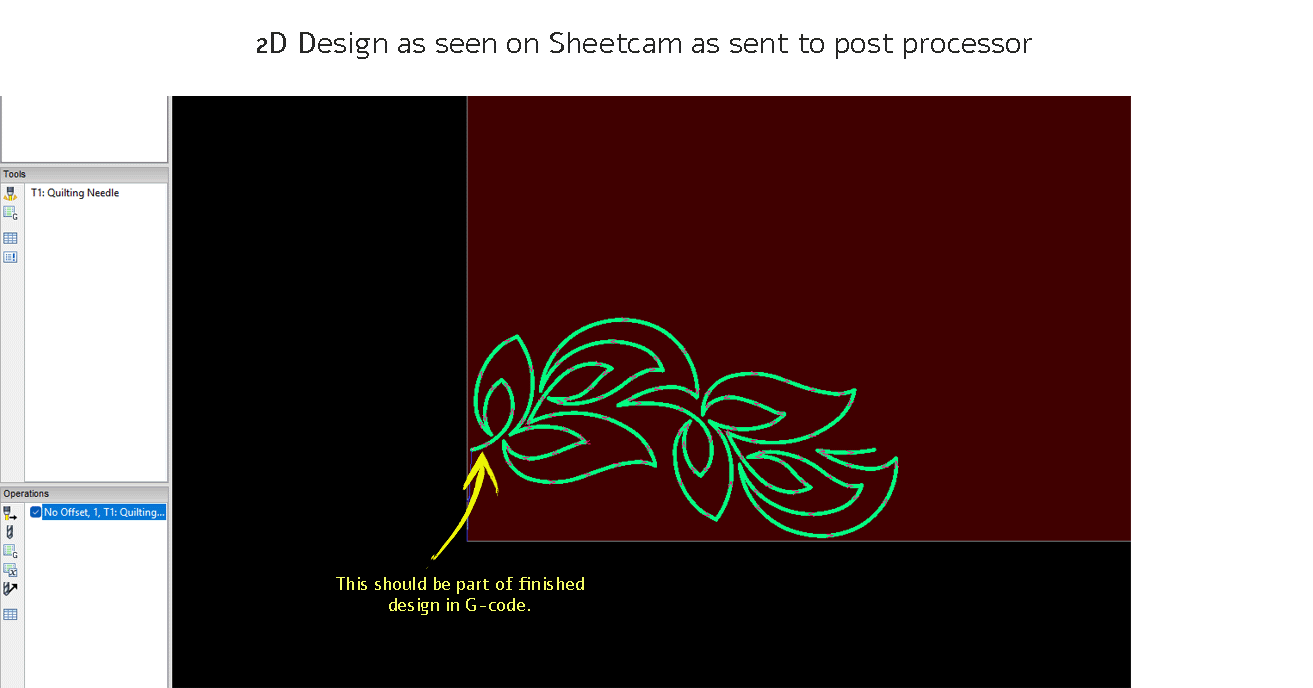
ScheetcamTroubleShootingImage_11313×688 40.6 KB
This design as shown on the image above is exactly what I’m hoping to get when I run the job.
But, The next post will show the design that I get when I run the G-code through any G-code viewer:
I am still in the trial mode in Sheetcam and desperately want to get this problem solved so I can purchase it.
I hope you can help me solve this issue. Thank you in advance!
This has been split into two posts since the bot will not let me post two images in one post as a new user. Here is part 2.
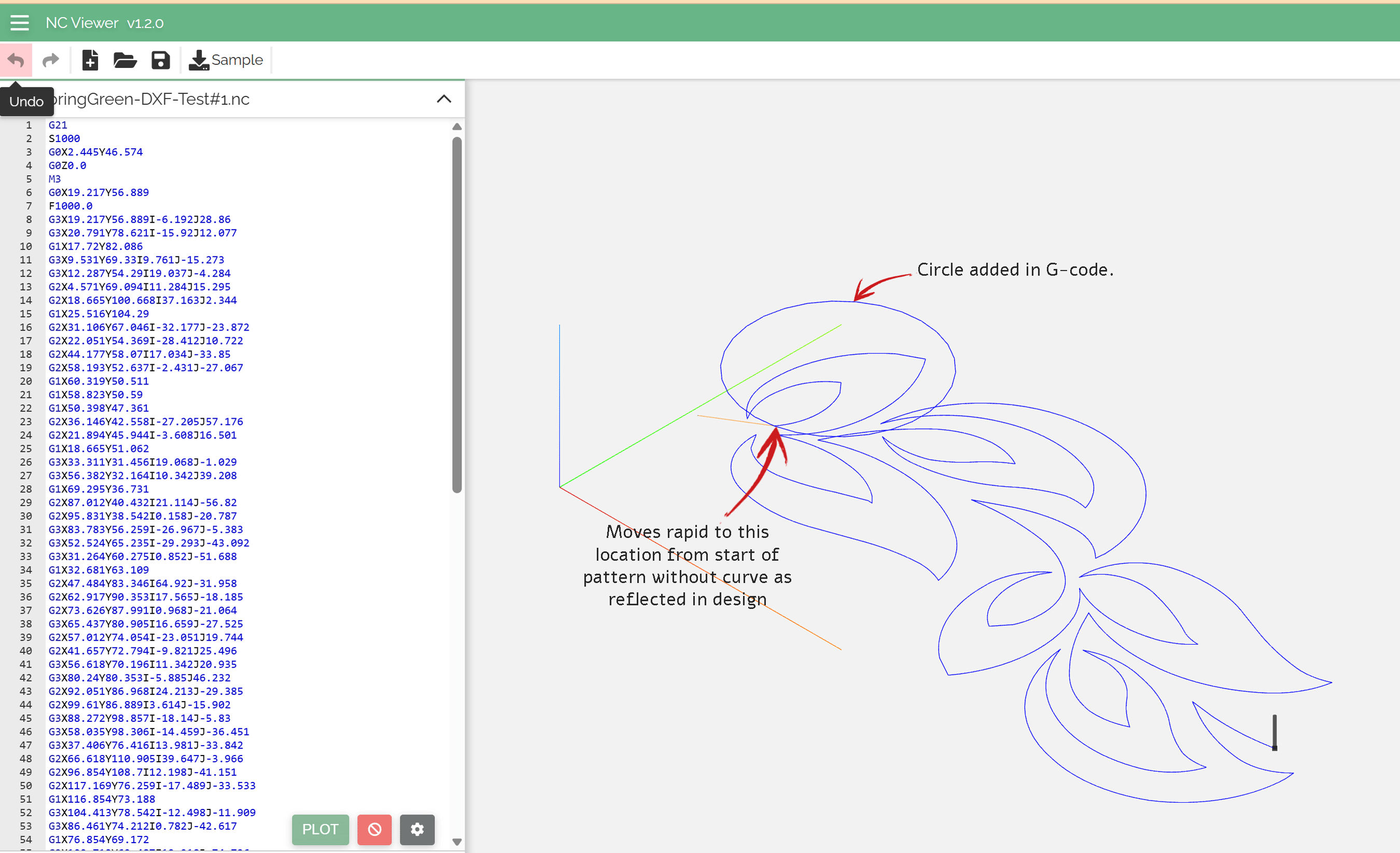
This image shows the design that I get when I run the G-code through any G-code viewer:
There are two issues: 1st, the machine goes to where the design starts and then rapids over to the second point in a straight line instead of giving us the curved line that is shown in the original design. And 2d, it installs a perfect circle that is NOT in the original design.
In this view you can see the G-code that was produced in the post processor that also produced the circle. This is the fourth or fifth different pattern that I have tried with the same results. I have tried bringing in the original design image in both SVG and DXF. I have actually run a couple of them on the machine and, as you would expect, it runs just as it shows here.
I am still in the trial mode in Sheetcam and desperately want to get this problem solved so I can purchase it.
I hope you can help me solve this issue. Thank you in advance!
Might be an issue with not being licensed. I’ve read where it can do goofy things sometimes with the gcode.
Not saying that’s the issue, but could be.
I don’t have my computer nearby, but maybe you could upload your post processor and somebody could try posting on a licensed version for you.
This certainly looks like malformed gcode after M3. Once M3 is posted to output, always by OnPenDown(), then there should not be G0 blocks until OnPenUp() where M5 is posted out.
As @djreiswig suggested, we need to see the post processor. but also please include your .job file.
LAD90063.job (14.7 KB)
Thanks so much for responding. Here is the job file, but I’m new to this whole CNC thing and Sheetcam so I don’t know what you mean by “see the post processor” as after getting the DXF drawing imported and scaled, I go to the Operation tab, select plasma cut (because this is a 2D job, and there isn’t an option for a sewing machine) check my parameters and click “OK”. Then I click on the Run Post Processor icon to process the code.
Thanks again, I hope this helps and if you can explain how I can help you “see the post processor” I’ll be happy to do whatever I need to to get the information to you.
@Nasshorn , let’s do this, a better option, load your job into sheetcam, run the post processor again, then goto menu Help / ‘Create a support file’. That eventually creates a zip file, upload the zip file to this thread. That should have everything we need. Note, never do this support file upload to this forum if/when you have a sheetcam license, because your license is included in the support file. But in your case NOW, you don’t have a license, so no problem.
Alternaively, you can send me a direct message with including the zip file.
Thanks for your help. I’ve been out of town and unable to respond until now. Hopefully I’ve attached the right file for you to help. I really appreciate it!
FYI: Before I actually run the code on the machine I add two lines: I insert a new line 2 as “G90” and then I insert a new line 8 (If I hadn’t added line 2 it would be Line 7) to allow my wife to get her sewing machine ready to stitch using “G4 P45”. As you can see in the Gcode on my original post #2 those lines have NOT been inserted but the problems I’m referring to are there anyway.
Support-Nasshorn.zip (34.4 KB)
The problem resulting in the added circle at the beginning of your toolpath has to do with the G0 stmt following M3. That addition of G0 logic in the pp seems to be a mistake only occurring after sheetcam v7.0.21, based on my compare of those pp files.
Since you also desire to pause after M3, I added "post.Text ('M0… " in OnPenDown() after M3. The M0 machine pause requires the operator to press the Play or Resume button on the console to resume machine motion, which you may prefer instead of a timed delay of 45 seconds. If not, you can easily change it in the pp or comment out the pp line entirely with ‘–’ as leading chars on the line, you’ll see other commented logic lines as such.
See the attached pp and gcode, you may use the pp as is or adjusted as noted here.
GRBL Nasshorn Quilting V2-3.scpost (4.2 KB)
SpringGreenTest#1.tap (3.9 KB)
 Thank you!!! It works perfectly after I made the modification on line 92 of the PP to give it a G04 P30. It’s interesting that everywhere I read that P counts in milliseconds but I’ve been using Pxx, since that is what I was told the first time, and the number of seconds and that’s what it gives me . . . 30 seconds pause in the case of P30 etc. My wife’s sewing machine does not have a play or resume button, so I’m forced to use the G04 code.
I’m truly grateful for your help! Can you point me to where I can learn how to copy and paste a pattern and then connect them so that I can run several in a row?
1 Like
you’re welcome, glad to help.
Assuming your pattern is a single dxf file, once imported as a Part into sheetcam, select the Part, then goto menu Mode / Nesting, then right click on the drawing, select Array and you’ll find what you need, experiment with Arrays.
Once you get duplicate Parts in an Array, ‘connecting’ them, in terms of processing each one sequentially, is automatic unless you apply manual override. This is where toolpath sequencing controls are split between managing it within a Part vs. managing Part to Part. For Part to Part, see Options / ‘Job options’ / Nesting and you’ll find controls to manage sequencing. This is likely what you want since your example above has only one toolpath (contour) within the Part.
If you ever have a dxf with more than one toolpath, you control the sequencing of the toolpaths within a Part via the Operation / ‘Cut path’.
For many of these general sheetcam use cases, see Where to learn Sheetcam
1 Like

 You are Heaven sent. Thank you so much for being so willing to share your knowledge!!!
1 Like
Per our Phone conversation here is both the G-Code file and the Job file.
NewPostSpringGreenTriple#1.tap (10.9 KB)
Support-NewPostSpringGreenTriple#1.zip (36.9 KB)
just a reminder for @Nasshorn and others, don’t post support.zip files in this forum once you acquire a sheetcam license. The zip file will contain your license file, which will then distribute globally and become invalid, forcing you to purchase a new one. In your case @Nasshorn , your zip file does not have a license file, no worries, you either deleted it from the zip or you are using sheetcam unlicensed (which is fine but limited gcode file size in most cases).