I just tested it here on Ubuntu 20.10 and get something similar. I’m not sure what is going on. It’s difficult to debug under Wine.
I’m on a Mac. I have looked at the wine registry and the setting for TEMP and TMP seems to be normal.
Path rules:
a) program crashes when selecting empty field:
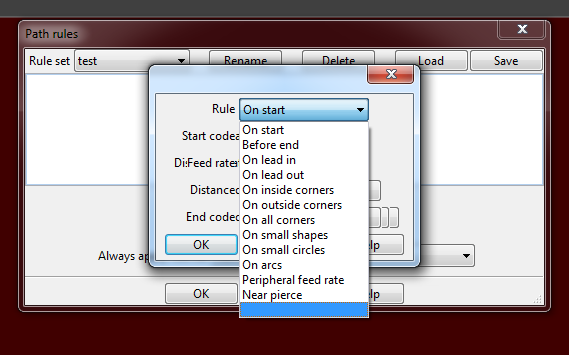
b) old elements from previous selection of the upper drop down menu are not removed
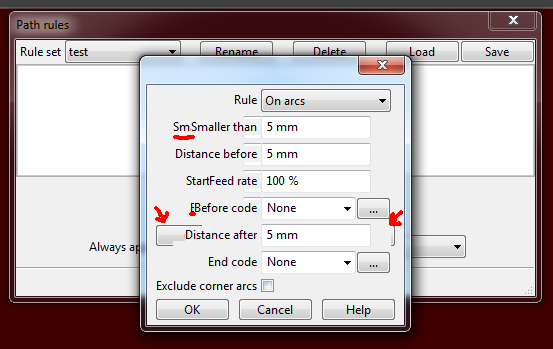
In version 6.030 and the linux version that did not appear.
Another Thing, not a bug, but inconsequent I think.
When milling a thread, the feed rate is always adapted to the peripheral feed rate like when the cutting rule “peripheral feed rate” is used with “minimum feed rate” = 50%.
But on normal circular offset operations that behaviour is only applied when using the cutting rule.
Why not the same behaviour for thread milling and circles? Because they don’t differ so much.
May selectable with a check box in the milling operation dialog to not have to apply a rule?
And why the is lead in feed rate fixed to 1/3 of the chosen feed rate?
Thanks. These are fixed for the next release.
When milling a thread, the feed rate is always adapted to the peripheral feed rate like when the cutting rule “peripheral feed rate” is used with “minimum feed rate” = 50%.
But on normal circular offset operations that behaviour is only applied when using the cutting rule.
The milling operation was around some time before rules. It uses peripheral feed because there is often a big difference between commanded feed and the peripheral feed. I guess I could add an option to not use peripheral feed but when would you actually need it?
And why the is lead in feed rate fixed to 1/3 of the chosen feed rate?
If I remember correctly I went by the recommended values from a thread mill manufacturer.
[/quote]
In most cases I think its quite okay so. I Just wondered why the feed rate differs so much and it took a while to figure out that.
An option that’s enabled by default would clarify that.
And having a little bit more control may would be useful in some cases. Imagine milling a small outside thread (3mm) with a large thread mill (10mm): The feedrate would then be about four times higher than the entered value  .
.
And yes I know adding multiple options would not be very user friendly. Maybe limiting to 200% the feed rate? I’m sure you find a way… 
Ah, ok.
Another thing I noticed while dealing with that is regarding the rule “Peripheral feed rate”.
When the feed rate has to be reduced on an inside arc, the minimal feed rate is not calculated. It is always set to the entered “Minimal feed rate” value.
So when entering no lower limit the resulting feed rate is zero.
By the way: What does the setting “Depth of cut” does in this context? I found no documentation about the path or cutting rules.
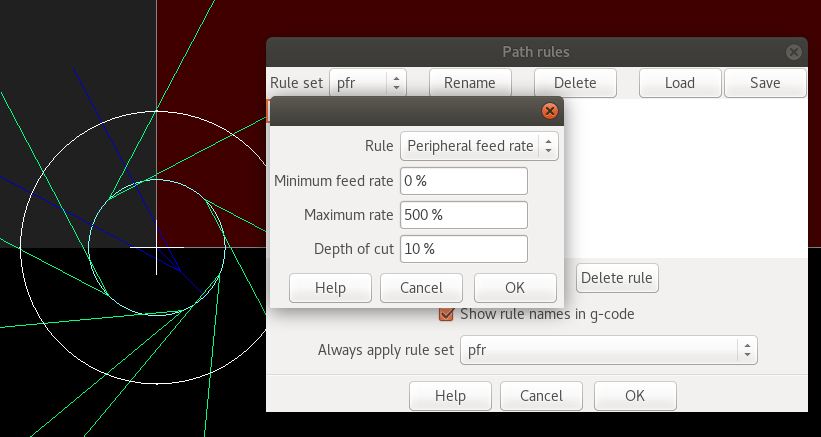
The inside arc feed rate calcs are wrong. I have fixed it for the next release.
It’s a long time since I added this rule but depth of cut appears to be a misguided attempt to adjust the feed rate depending on how much material is being removed. I think I’ll remove it.
Yeah!
Have you a new release date in mind? Wasn’t that first planned for february?
Whow that’s high speed bug fixing. Very nice, thanks!
And even the other things with the tool table editing. Cool!
Peripheral feed rate works now fine I think.
But a little thing is left.
In my test I have chose a feed rate of 200 mm/min and the min feed rate 0% and max feed rate 500% (for testing).
On an inside arc it does that:
N0150 G01 Z-1.0000 F100
N0160 X25.2563 Y28.4364 F200
N0170 X25.2561 Y28.4081 F1000
N0180 G03 X25.6511 Y27.9216 I0.4857 J-0.0092 F22.0404
N0190 G01 X165.2438 Y27.9119 F200
and on an outside arc that:
N0370 G01 X22.2662 Y116.7132 F200
N0380 G02 X22.2747 Y116.8720 I1.5000 J-0.0002 F1000.0
N0390 X25.6100 Y120.0312 I3.5190 J-0.3749 F302.6124
You see there is each a very small segment that has the max feed rate.
In practice I think we could neglect that for this feature.
But I think that is more a problem of the drawing respectively the drawing import.
But it’s a regular rectangle created by Inkscape. May you could have a look…
I attached the files.
Regarding this I managed again to crash the program. It occurs when scrolling down the list (fast) to the end with the mouse wheel or with key down/up pressed. Sorry.
test_rect.zip (7.3 KB)
The errant feed rate is due to there being a tiny arc in that place. SheetCam calclulates the peripheral feed rate for that tiny arc but the post converts tiny arcs to lines. In the next release peripheral feed rate won’t change the feed for tiny arcs.
I have also removed the ‘depth of cut’ feature so the calculated feed rates will be a little different.
Regarding this I managed again to crash the program. It occurs when scrolling down the list (fast) to the end with the mouse wheel or with key down/up pressed. Sorry.
Fixed for the next release. Please don’t be sorry for reporting bugs. There is no way I would have found this one in my own testing. It only shows up when you scroll through the selections really quickly.
Great, thanks!
Ah the post removes that tiny arcs. That makes sense.
I tested with a new created “clean” dxf file and with that it works also with this version. But good to have bad files to test with 
I noticed a funny thing with the path rule: When setting the start point in the mid of an arc it generates a single feed command. But I think that is no problem for the g-code interpreters.
N0150 G01 Z-1.0000 F100
N0160 F152.174
N0170 G02 X18.5000 Y12.0000 I2.2718 J2.6625 F304.3478
By the way: the icons for toolset loading haven’t you swapped yet - is that right?
The icons have changed but I also swapped open and save so that they all appear in the same order.
No there hasn’t changed anything on my pc.
Maybe a problem because I have installed two different versions parallel?
it would be nice if you could select an outline or two and create a layer which you could place those outlines on. It’s rather painful having to switch back and forth from sheetcam to a dxf editor like coreldraw, Adobe AI, Aspire or lightburn. Only one of these even has a linux version. which means you are switching back and forth between computers and this is where mistakes can happen.
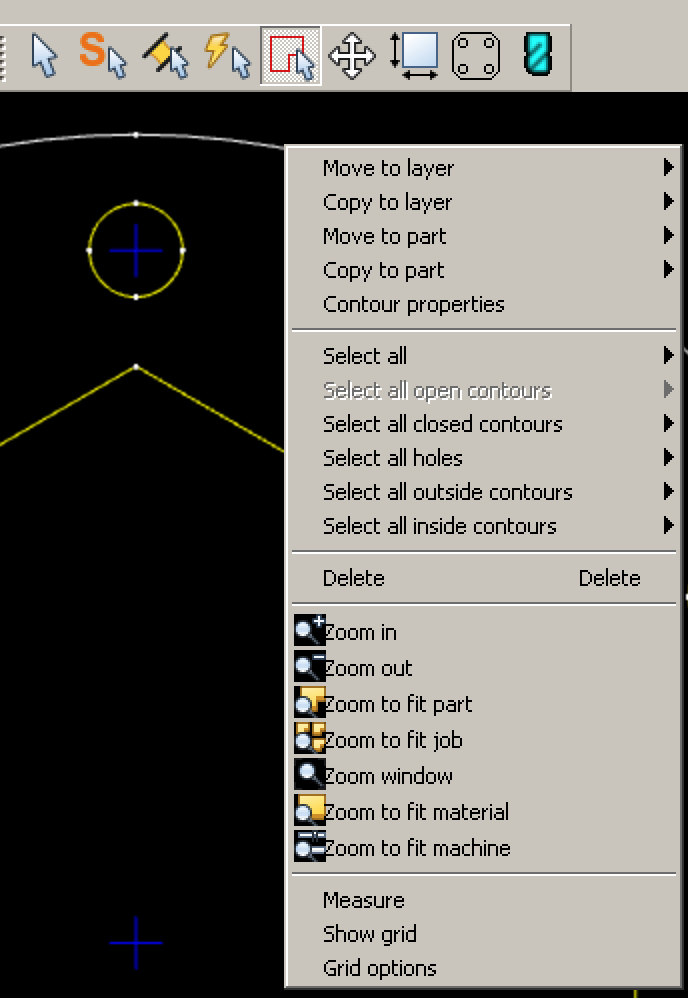
Grid Color
When selecting “Grid options” via right click, the grid color is resetted to black
“Loading default toolset” icons
I installed v7.1.1 on a clean VM and there the buttons for loading the default toolset are correct. But on my machine where I updated to this version they are still wrong. Any Idea?
Another thing that only happens in the updated 7.1.1 is that the machine and workpiece is not shown. Only disable and re-enable this view makes the material appear.
Translation files of context menu
I noticed that there is no de.mo any longer. Have you merged these files together?
But I think that was the place where the translations for the right click context menu was stored. In the last linux version that was correct.
Anyway, this context menu is no longer translated except one resp. two entries.
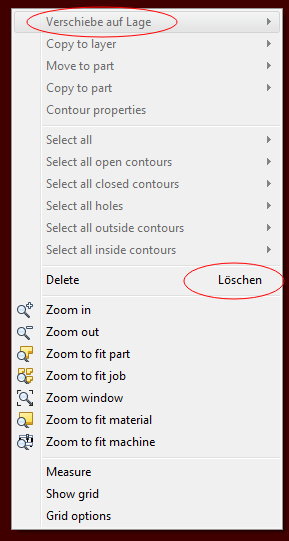
Is it now my turn to complete the new message.mo file? If yes - could you then please update the file and remove all items that are not used any longer? (if this can be done automatically)
Path Rules
When canceling “Add new rule set” it seems afterwards that the existing rule is deleted:
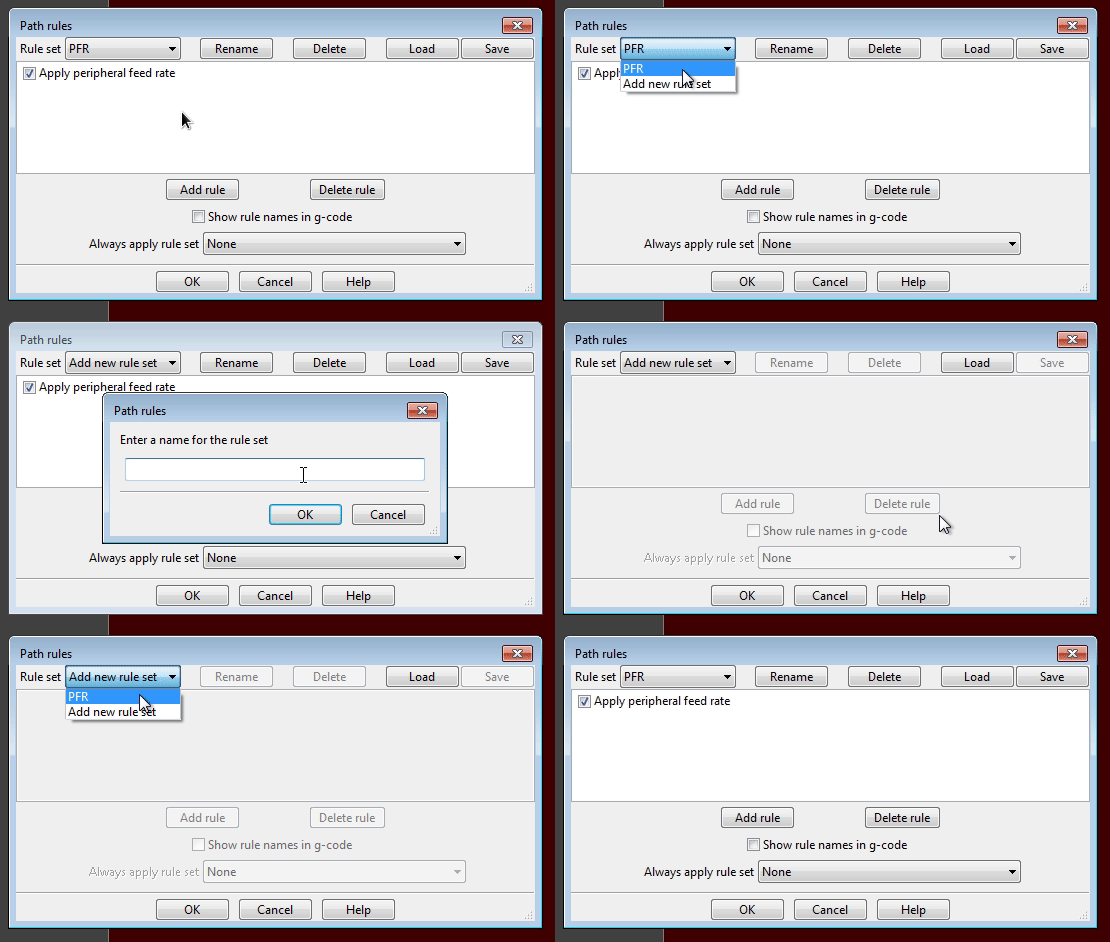
But the peripheral feed rate works very well now  . Sadly things like “this works great now” or “I like that feature” are not mentioned in a bug reporting thread like this …
Fixed for the next release
“Loading default toolset” icons
I installed v7.1.1 on a clean VM and there the buttons for loading the default toolset are correct. But on my machine where I updated to this version they are still wrong. Any Idea?
Ah, the installer is trying to be clever. It does not overwrite files that are the same age or newer. I have changed the date stamps on the icons.
Another thing that only happens in the updated 7.1.1 is that the machine and workpiece is not shown. Only disable and re-enable this view makes the material appear.
I can’t replicate this one. When exactly does this happen?
Translation files of context menu
I noticed that there is no de.mo any longer. Have you merged these files together?
I’ll add them in the next release.
But I think that was the place where the translations for the right click context menu was stored. In the last linux version that was correct.
Anyway, this context menu is no longer translated except one resp. two entries.
Oh, that’s a bad one. I’ll fix it straight away.
Is it now my turn to complete the new message.mo file? If yes - could you then please update the file and remove all items that are not used any longer? (if this can be done automatically)
You should find a file called messages.pot in the Languages folder. This contains the latest translation strings. In Poedit load your translation then select Catalogue->Update from pot file. Open that file to merge the files. It will automatically remove any unused strings.
Path Rules
When canceling “Add new rule set” it seems afterwards that the existing rule is deleted:
It does not delete any existing rules. It just blanks out the options as you have no rule currently selected. You can select your existing rule set from the ‘Rule set’ dropdown. In the next release I’ll make it revert to the first rule set.
Thanks!
When I start the program (without a job). When loading a job the machine and material appears.
I’m not the only one with that problem as you surely have mentioned: https://sheetcam.discoursehosting.net/t/update-problem/6826/1
Yes I know that it is not deleted, therefore ‘seems’. In the gif it is not good to see because of the wrapping…
I added the de.mo manually, but that didn’t fix the centext menu.
I’ll have a try with the messages.pot and report you.