The shape will always be normalised so the centroid is at 0,0. That is a part of the way SheetCam’s internals work and it’s not practical to change this.
However you should be able to force the shape position. At the end of shape.Calculate() add this:
tempObj:SetPosition2D(sc.Coord2D(x,y))
x and y are the absolute coordinates of the centroid of the shape.
Note this is untested so it may have unexpected side effects.
Note this is untested so it may have unexpected side effects.
I’ll be glad to test it out for you  Thanks Les!
Hey Les, So far, I have not been able to make that line of code do anything. the shape normalizing code must be overriding it or something.
It is moving the shape but it doesn’t update the displayed coordinates. Try this instead:
   tempObj:SetPosition2D(sc.Coord2D(x,y))
   posX.value:op_set(x)
   posY.value:op_set(y)
   posX.editor:GetValidator():TransferToWindow()
   posY.editor:GetValidator():TransferToWindow()
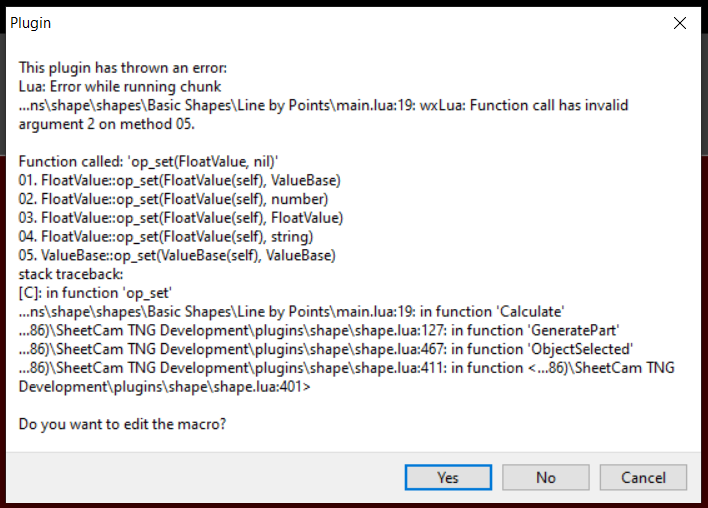
That didn’t exactly work either Les… Here’s the error if it is inside the function block, which i think is wrong placement:
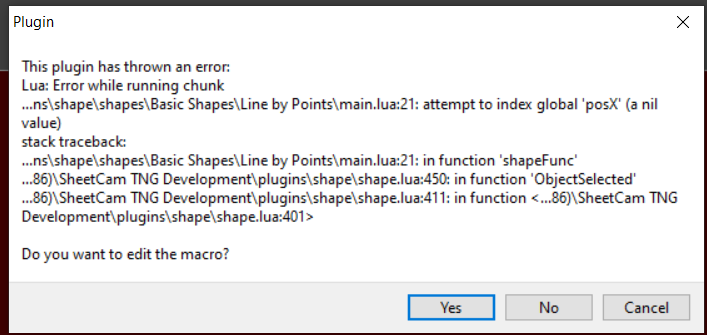
And here’s if its placed after the function end:
and heres the code:

It needs to be inside the function. x and y need to be set to the x and y coordinates of the centroid of the shape.
Heck yea, that fixed it! Thanks! Works exactly as I intended now. Or seems to at the moment anyways. I really wish I had the time to learn how to code better… seems like I know just enough to be dangerous and annoying lol
Hey Les, some of the comments in the shape files say a line of zero length creates a point but i am not getting anything any points being created. I wanted to add a point shape so i could use the drill operation to just make a pierce hole to locate holes that need to be machine drilled or something.
Here is the code:
Circle(shape.X, shape.Y, 20)
	Line(shape.X, shape.Y, shape.X, shape.Y)
I first tried just the “Line(sh…” and got nothing so i tried putting in a circle that i know generates and the circle is added to the part, but not the line or point. Any thoughts what’s causing this.
Huh. It looks like I lied. A zero size line will be ignored. You can however use a circle of zero diameter instead.
In the next release I’ll add a Point function. You can add it to your version if you want:
Run SheetCam as administrator then go to Options->plugin options->shape and click on the 'Edit macro" button.
Add this function:
function Point(x, y)
   Circle(x, y, 0)
end
It doesn’t matter where you place it but for consistency I’d add it just after function Circle. This addition will be in the next release.
Now you can use Point(shape.X, shape.Y) to generate a point. Note that points won’t show up until you add the shape to your part.
--Circle(x, y, diameter) -- circle
--Line( x1, y1, x2, y2) -- Line from X1, Y1 to X2, Y2
--MoveTo( x, y) -- Set Current Position
--LineTo(x , y) -- Line from current position to X, Y.
--ArcA(startX, startY, CentreX, centreY, angle) -- angle in Radians, Positive Angle Clockwise

-- line with zero length = "point"

-- SHAPE NAME: Donut

shape = {}

function shape.Calculate()
   local dd1 = shape.diameter1
   local dd2 = shape.diameter2

	Circle(0, 0, dd1)
	Circle(0, 0, dd2)

 end

AddNumControl("diameter1", TR("Inside Diameter"), sc.unitLINEAR, 50.8, 0.0254, 6096, "insidediameter.png")
AddNumControl("diameter2", TR("Outside Diameter"), sc.unitLINEAR, 101.6, 0.0254, 6096, "outsidediameter.png")
I noticed that the images (insidediameter + outsidediameter) are not showing up when clicking on the textbox to edit the dims in the current development version [7.1.7] (not sure when they stopped working though).
Hmm, you’re right. I’ll try to fix it for the next release.
Hey Les, I added some more shapes to the library and fixed/added some of the bitmaps and icons. I have attached my latest version of the shape library if you would like to incorporate it into the next release.
Also, something appears to still be wrong with the bitmaps showing in the shape window. The icons are displaying in the dialog fine, but none of the explanatory bitmaps are showing in the shape window when you click a box to edit.
shapes.zip (1.48 MB)
thanks for taking the time to continue this work
Thanks for the update. I think I know what is going on with the icons so I should have it fixed for the next release.
No problem, just glad I can help out in some way other than come up with problems lol