Inscribed Shapes / Circumscribed Shapes:
(3sided)Triangle
(4sided)Square
(5sided)Pentagon
(6sided)Hexagon
(7sided)Heptagon
(8sided)Octogon
(9sided)Nonogon
main.lua (4.93 KB)
Interesting question / bug?
AddChoiceControl(“inOutShape”, “Shape Location”, {“Inscribed”,“Circumscribed”}, “”)
It appears that the “text / name” for the control does not appear on screen to the left of the dropdown menu {which is what does occur for “AddNumControl()” functions}
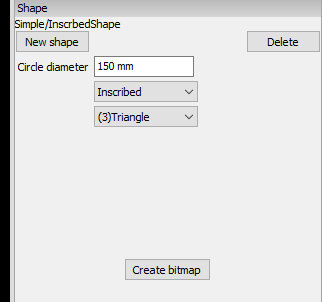
Rob, is it okay if I include these in the next release?
Yes Les, of course, not a problem.
I’ll just keep trying to add a few as there are different ways to input the same shape (eg, Triangle, could be an equilateral with just a height and width {which is what shape I’d done), but it could be a right angle with just a height and width… or it could be a triangle with a width and two angles or a height and two angles, or a height and width with one angle… I’ll just put them all in as individual shape options. say you are trying to cut out a gusset to fit a particular shape it could be measured in many ways… and a corresponding shape to match those dimensions you have to hand.

The triangular gusset already does most of what you want for triangles. Don’t try to go too complicated in one shape. It’s all too easy to confuse users with a plethora of options.
For your polygon function I think it may be better to just stick to equal sided polyons. It would probably also be better to use geometry to calculate the sides. The attached version allows any number of sides, though higher numbers get caught by SheetCam’s arc recognition and turned into circles 
By the way, have you had any crashing issues when playing with shapes? I am seeing some crashes here and it’s taking a bit of work to figure out what is going on.
main.lua (1.27 KB)
Les, not had any crashes. I’ve only run them on my laptop not the machine outside yet… but that should not have any problems (i7, 8gb, ssd)
I noticed any shapes with more than 9 sides ended up a circle…
Robert and Les, thanks for all of these generic shapes! They are a huge time saver. I have not had any time yet to try my hand at adding some but hopefully soon. Thanks again!
Finally had a chance to create some commonly used shapes myself. Thought i would upload them in case others would like to use them.
Les, feel free to include them in the next release if you think others may find them useful.
shapes.zip (676 KB)
I just uploaded a new release. This has the new shapes in it. Thank you.
Hey Les,
I’m working on creating some more standard shapes that we seem to use a lot of. I should be done in a few days, so hopefully they will be finished in time / be useful for the stable release coming up… if you would like to include them. Just wanted to give you a heads up.
Awesome. That would be great.
What’s your timeline looking like for the next stable release? With the flood of projects around the holidays, I haven’t had much time to work on the new shapes I mentioned.
At the rate things are going I’d say around the end of January. I had hoped to have things a bit more settled by now.
Hey Les, working on a few more shapes here and i think i am running into some issues with your location code for the shapes. This isn’t behaving anything like I expected. I expected to set the X,Y location to 0,0 and The coordinates would be whatever i type in X1, Y1, X2, Y2, but the line is totally dependent on the X,Y location input somehow. Can you see what is going on here?
SheetCam-TNG-Development-CoryMil.zip (1.21 MB)
function shape.Calculate()
	MoveTo(shape.X1, shape.Y1)
	Line(shape.X1, shape.Y1, shape.X2, shape.Y2)
 end
Also, i dont remember if the update has been released yet or not, i dont think it has, but the X position on the text plugin is still doing something wonky and the shape plugin X,Y are not auto-updating.
The datum for the X,Y coordinates is always the centre of the outline of your shape. In your example the datum point would be half way between X1,Y1 and X2,Y2.
Also, i dont remember if the update has been released yet or not, i dont think it has, but the X position on the text plugin is still doing something wonky and the shape plugin X,Y are not auto-updating.
These are fixed for the next release. Stable should be out today. Dev will probably be out sometime next week.
In shape, entering values in X and Y does work, it just doesn’t update the display. If you force a redraw, for example by zooming in or out you it will be shown in the correct place.
The datum for the X,Y coordinates is always the centre of the outline of your shape. In your example the datum point would be half way between X1,Y1 and X2,Y2.
That still does not explain the behavior i am seeing, unless i just totally dont understand something here. It seems to me it is completely ignoring my X1, Y1 Point and trying to generate the line off of the center point. And not all of the shape main.lua codes use the centroid as the origin of the shape, so how does that work? I think i need to know more about how your datum point works to make this shape work correctly.
When you create a shape it is normalised so that X0Y0 is the centroid. The part coordinates are then added to set the final position.
Are you trying to position your shape at an absolute position on the sheet?
Are you trying to position your shape at an absolute position on the sheet?
Yeah, thats exactly my intent. I was trying to make a line that i could place at an exact location. Not sure how i could do that if every shape is normalized. It would work, you would just have to calculate the centroid when placing the shape instead of starting a line on a known point and going from there like i intended.
It wasn’t really designed to work in absolute positioning. How come it doesn’t surprise me you’re trying to get it to do something it wasn’t designed to do? 
I don’t use shapes, but can’t you just put a formula in the post to calculate the center of the shape and offset the alignment?
It wasn’t really designed to work in absolute positioning. How come it doesn’t surprise me you’re trying to get it to do something it wasn’t designed to do? >
Me?? Try to make something do something it was never intended to do? I wouldn’t dare! lol Idk, that’s kinda my job, Les lol.
Maybe its worth considering redesigning for absolute positioning. Every single time i have used the shape library i always have a specific position and rotation i want it on the sheet. Hopefully some others will chime in with their opinions.
I don’t use shapes, but can’t you just put a formula in the post to calculate the center of the shape and offset the alignment?
That is possibly an option, but i am not sure if it would simplify what i am trying to do any. I am trying to place a shape in a specific position relative to other geometry already on the sheet layout. yes, im sure it could be done in the post, but it would be far easier to just use the nesting and alignment functions already in sheetcam. I am just hoping to simplify the process of doing it in sheetcam to one step.