Hi there
I am trying to figure out a working Post for my table,
I have been using Chatgpt to help me… but its useless, and has just made a mess, fixing one problem and creating 2 more!
Its very close to working, I just cant seem to get the Z axis to move first before X and Y on Rapids,
If I upload my Post is there anyone that could take a quick look over it and see if they can find the issue?
Cheers
new post, hopefully works!.scpost (5.0 KB)
I looked at your pp, a lot to digest there.
Some quick observations that can eliminate confusion on what gcode/text gets posted to the gcode file…
- use ModalText() carefully, best to not use, rather use Text()
- use ModalNumber vs. NonModalText() carefully, read this for quick behavior summary. It is important to understand ModalNumber() vs. NonModalNumber(), see the full descriptions in the pp doc link in the pp editor split screen at the bottom and also in Options / Machine / ‘Post processor’ or just point your browser to the doc from the sheetcam install folder such as (file:///C:/Program%20Files%20(x86)/SheetCam%20TNG/Languages/en/HTML/Post%20Processor.htm)
- sheetcam core/engine (which invokes the pp functions) will manage motion of Z to ‘safeZ’ position, which is defined in Options / Job as ‘Rapid clearance’. You won’t see the code in the pp. It does this after OnPenUp() by modifying endZ to safeZ value, then invoking OnRapid(). Since OnRapid() should be written with ModalNumber() axis keys (" Z" for instance), then the call to OnRapid() will only post the Z axis since endX and endY haven’t changed yet. After that call to OnRapid(), sheetcam core will call it again after having changed endX and endY.
You are largely on the right track with the rest of your pp, good job.
here’s a simple job, pp, and the gcode it produced. Experiment with this.
GRBL plasma v3.scpost (4.3 KB)
p- 3 simple shapes.tap (1.4 KB)
p- 3 simple shapes.job (13.6 KB)
That gives me a great start to actualy learn the hows and whys! my “shortcut” of using chatgpt has just created a mess, and Im still none the wiser on how it all works!
I will do some reading and experimenting and try and get my head round it,
Thanks very much for having a look for me!
anyone help me get the order here corect?
Z3.7000 <this should be coming After the probe and just before the torch fires
G31 Z-100 F500
G92 Z0
M03
heres the part of the post that im guessing is the issue?
function OnPenDown()
– Probe on first pierce or if distance exceeded
if firstPierce or dist >= refdistance then
post.Text(" G31 Z-100 F", probeFeed, “\n”)
– post.Text(" G92 Z", switchoffset, “\n”)
post.Text(" G92 Z0\n")
dist = 0
firstPierce = false
end
post.ModalText (" G00")
post.ModalNumber (" Z", pierceHeight * scale, “0.0000”)
post.Text (“\n M03\n”)
if (pierceDelay > 0) then
post.Text (" G04 P")
post.Number (pierceDelay,“0.###”)
post.Eol()
end
what do i have wrong thats messing up the order? Or shoud my probing routine be somewhere else?
OnPenDown() is the correct function to do this. What you’re seeing in gcode is that sheetcam core positions Z to pierceHeight just before invoking OnPenDown(), which is correct. your pp must return Z to pierceHeight after the probe sequence while in OnPenDown().
I found another post from a thread on here, I think it is one of yours actually!
Seems to do most of what i want, but it probes on every single PenDown, I wondered how to implement a way of have a reference distance variable i can edit for material thicknesses so it doesnt probe every time?
I have used this method before, I just down want to break this post now that its working ok!!
Mach3 test plasma THC Proma with probe ohnic touch.scpost (4.3 KB)
peediechick.tap (25.9 KB)
thats the current output, I think it looks ok
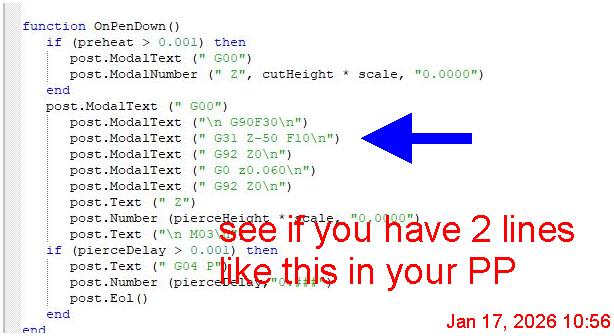
to me that G code looked perfect, but when i ran it, the probe routines for some reason dont work properly, and the Z hight ends up way off, by about 40mm,
chatgpt says that having more than one G31 probe routine followed by the G92 stacks the offset and causes my issues,
Im not convinced though as it happens on the very first time, and also, I have used this before in a previous post i was trying and it never caused the issue.
Any ideas?
cheers
unfortunately I don’t know Mach, so I’m hard pressed to read that gcode for accuracy.
sheetcam has many Mach pps, you don’t find one that is a close fit ?
update: That pp you posted above is from Tom V., aka @acourtjester . Tom is a good guy, CNC builder++, he may be able to help you. Yes, I have my ‘finger prints’ on that pp, helped Tom with feedrate matter awhile back.
There should only be one G31 per cut operation.