I put together a small Lua plugin that I thought might be useful to other SheetCam users.
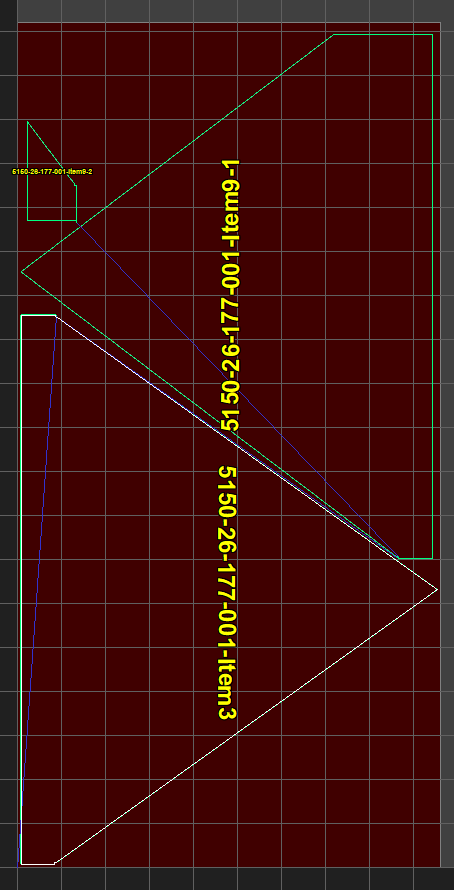
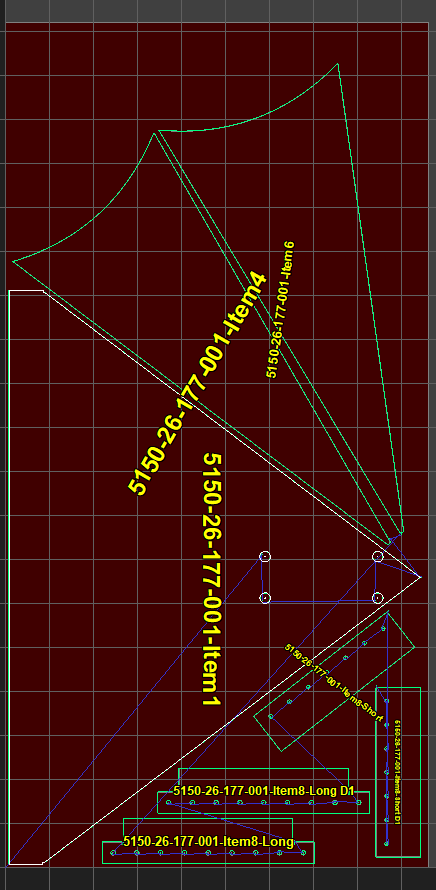
The original idea was pretty simple: when we cut a sheet with a number of different parts nested on it, I wanted an image the operator could look at and immediately identify which finished part was which.
SheetCam already gives me a nice image of the nested job, so the plugin captures the full material view and overlays the SheetCam part name on each part. It then saves the finished PNG in an Images folder alongside the .job file.
What started as “just put the part name on the image” turned into a little more than that after trying it on some real production nests.
At the moment it:
labels each enabled part with its SheetCam part name
recognizes SheetCam duplicates and replaces names like Duplicate 1 with the parent part name plus D1, D2, etc.
sizes the font individually for each part
rotates the label to follow the part orientation
keeps text upright for readability
checks labels for collisions and will shrink/reposition them along the part when necessary
uses yellow text with a black outline so small labels remain reasonably visible
saves the image as:
JobFolder\Images\JobName.png
I have been using it on our production nests and it is working quite a bit better than I originally expected.
I have tested it with both SheetCam 7.4.1 and 8.0.1.
A little disclaimer: this is still very much a shop project rather than a polished software release. So far my “version control” has mostly been:
edit → test → edit → test → don’t break the version that worked 
I have not created a GitHub repository or done any formal version/release management yet. If there is some interest in it, I will clean that side up and put it on GitHub so changes, issues, and releases can be tracked properly.
There are undoubtedly nests and part arrangements I haven’t encountered yet, so I would actually be interested in people trying it on jobs different from the ones I normally run. If you find a case where the label placement/orientation does something strange, an example job or screenshot would be useful.
One known limitation at the moment is that the orientation logic is based on SheetCam’s stored part rotation and assumes a normal rotated part rather than a reflected/mirrored transform. I haven’t had a real-world mirrored-part case to test yet.
I’ll attach the current .lua plugin and a couple of example images showing what the resulting part map looks like.
Feedback is welcome.
SheetCamPartMap.lua.txt (26.5 KB)