Hi.
How can I change the position of the X axis to the Y axis?
My machine works along the Y axis but in sheetCam it does not give me the option to change it, it only gives you the option to work in the direction of the X axis.
How can I solve it?
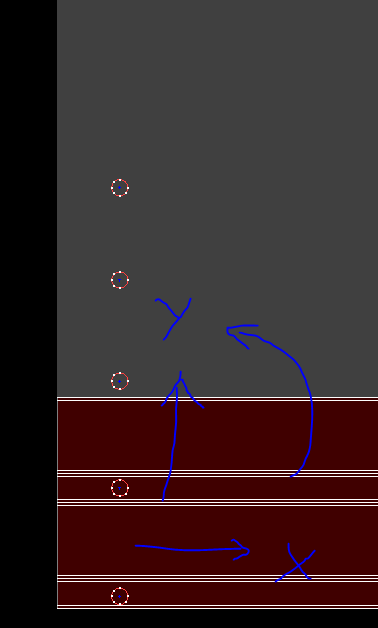
The rotary plugin currently only works along the X axis. It is however possible to modify a post to swap the X and Y axes. What post processor are you using?
I am using Plasma Rotary Mach3.
I have also tried Plasma Rotary Mach3 swapped axes and change the address in Mach3 and the problem is solved, but I would like the rotary complement in sheetcam to work along the Y axis as well.
I do not know if it is very complicated to have that option in the rotary complement but you should include it in the next update.
Thanks for your great work
Unfortunately it is pretty complicated to change the direction. I will take a look but I doubt if I’ll be able to make this change quickly.
Thanks for your attention .
Now I have a little problem in the G code that the postprocessor generates, it’s a line that I get over when I’m going to look for the Z axis probe.
The postprocessor that I am using is PlasmaRotary Mach3 swapped axes.
Can you tell me how I can eliminate it from the postprocessor?
PlasmaRotary Mach3 swapped axes.scpost (8.24 KB)
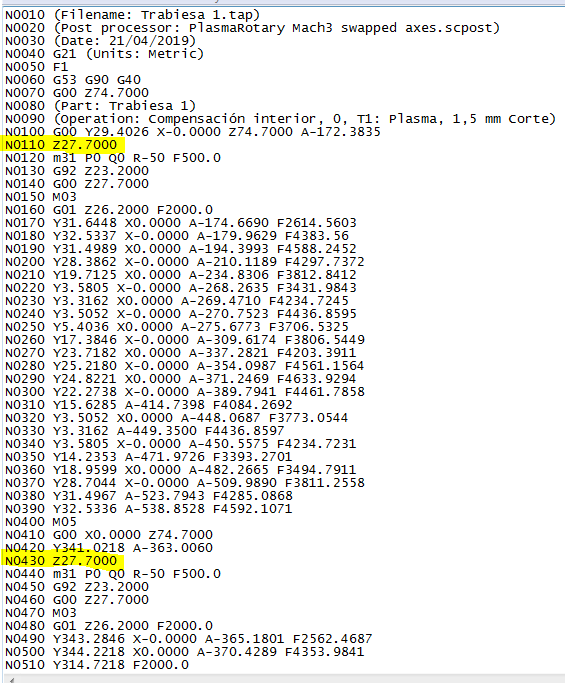
The post assumes your Z is roughly correct when you start. Are you having trouble with just the first Z27.7 move or all of them?
I have problem in all the movement should look for the M31 at the height of Z 74,7 mm and not at the height of Z 27,7mm.
The diameter of the tube is 50.8mm