Tom states several times that using the ramp pierce in sheetcam messes with the DTHC activation/timing in CandCNC systems.
Well, for some reason it works fine for me. Just cut some more 1/2" tonight using nothing but the ramp pierce. Maybe my post processor is set up differently, I don’t know. But it cuts wonderfully and never hits the slag pile. DTHC turns on and follows the cut height without missing a beat.
Les,
I know (based on your PlasmaSpider post) that working on CandCNC posts isn’t your favorite thing. LOL That being said, any chance you’ve been able to look at this, and see what needs to happen to make it work? Moses has been quiet on the CandCNC site since Tom chimed in with his opinion on the “correct” way to use the posts.
Sorry I thought that one you posted on this thread worked. What is wrong with it?
I have attached a post that should do the piercing. You will have to use a different post for cutting. If you go to Options->plugin options->moreposts you can add extra post processor buttons so you don’t need to go through Options->machine->post processor each time.
Les, the moreposts plugin does not seem to be in the Linux version of Sheetcam.
Steve
Les, the moreposts plugin does not seem to be in the Linux version of Sheetcam.
It is there. In plugin options you may need to click on the right arrow to scroll through all of the tabs.
Hey Les, I found the plugin, but not by using the right and left arrows on the screen to access it. I had to use the keyboard right and left arrows to access it. The screen arrows display only the far left 8 plugins, or the the far right 6 plugins out of a total of 16. The 2 in the middle are not displayed.
The screen arrows don’t scroll, they jump.
Steve
That’s odd. I checked again here and it worked fine. Controls like this are handled by GTK+ 2. All I can think of is that you have either a different version of GTK or it is set up differently.
Thanks Les,
It is probably the desktop environment I am running or some such thing. Linux does seem to be a bit picky depending on what version you are running.
I’ll play with it a little more and see what I come up with. It’s really no big deal now that I have found it. The only odd thing left is after using the more posts option to add another post is it doesn’t put an icon on the tool-bar like windows sheetcam, but it does put a menu selection at the bottom of the File menu drop-down.
Steve
Yup, I can see the icon problem. I’m not sure what is going on there. I’ll run some tests.
I found the problem. Linux file names are case sensitive and Windows file names are not. It will be fixed in the next release.
Hi,
Are there any updates to this? The modified post for CommandCNC is not working.
If we could just go through and pierce the holes, clean the pierce slag off the plate, and then cut with new consumables life would be good!
What problems are you having with the post?
It makes it to line 12 with "unexpected Character after O-word. It does appear to go to the 1st location and stop.
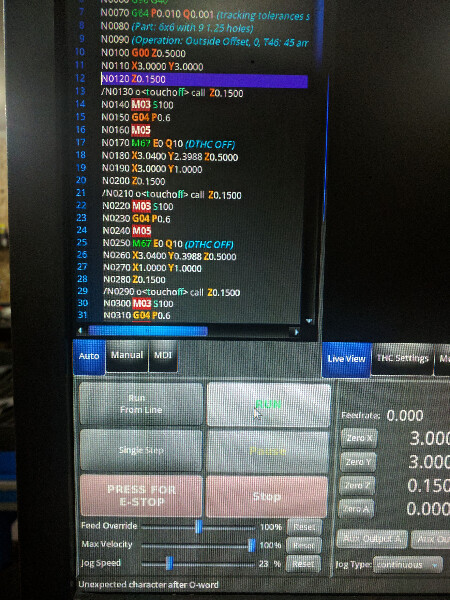
I just checked and the format looks correct for LinuxCNC. Are you using LinuxCNC?
Yes I have CommandCNC from CandCNC.
I think I have found the problem. Try this version.
THC_pre-pierce_LinuxCNC.scpost (4.29 KB)
I just tried the new post and it didn’t work. It loads and when I push “run” in CommandCNC nothing happens. In the bottom left corner it says “Must use G0 or G1 with G53”
I edited the g code file by removing G53 and run the file again the machine worked as normal and it made the first pierce successfully but after making the second touch off the torch didn’t fire and it continued to the 3rd point and it pierce successfully. The machine continued by this sequence up to the end of g code file.
If you edit the post you can remove the G53. It is on line 51.
I can’t see any reason why it would only pierce every second cut start. It could be that the pierce delay is too short for your machine. Try increasing it. If you still can’t get it to work post a copy of the g-code file here so I can take a look at it.
Downloaded Les’ 8-17-19 post, to see how it works. Ran into a situation where I need the capability again. We’ll see how it goes! Thanks!